Article
An Opinionated Guide to Agentic Coding
On the rise of agentic AI coding tools, the importance of the harness over the model, and general principles for getting the best results from AI agents in a research workflow. Originally a talk given to my research group on March 13, 2026.
Preface.
"It is difficult to get someone to understand something, when their salary depends on them not understanding it." — Upton Sinclair
It is March 2026. At this point, almost everyone who writes code as a part of their job has heard of the catchphrase "agents". It is nigh impossible to find someone who doesn't have an opinion on them too. Agentic coding is like Marmite: you either love it or you hate it.
Given that I'm writing an essay about agentic coding, you might guess that I fall decidedly in the former camp. But as a junior AI researcher, I feel that the fast progress of agentic large language models (LLMs) hangs over my head like a sword of Damocles. I understand the fear and dislike of a large portion of the general public towards AI. The state-of-the-art LLMs have practically seen the whole internet in their pretraining data. They know more textbook knowledge than me about many topics (even in machine learning, to my constant dismay), and they can read and write far faster than me. It is hard to not have a healthy respect for the technology and slight fear for my future.
Yet, contrary to the spirit of the quote I began with, I believe that the best way forward is to figure out how to best leverage these agentic tools and use them as aggressively as possible. Developing solid knowledge about any cutting-edge, paradigm-shifting technology will only help you, regardless of whether you are a researcher, a software engineer, or even a student. Learning how to steer these tools effectively and better than others means that you can be a greater force multiplier in an age of agents. Of course, you need to have enough fundamental knowledge to make these tools useful: ten times zero is still zero. But that is not what this essay is about.
I have always been an early adopter of new technology, and have been using AI-assisted coding tools since GitHub Copilot was made generally available in June 2022. In January 2025, I started using Cursor, which is a fork of the VSCode IDE with native AI integrations. In January 2026, I ran out of Cursor Pro student credits with about three weeks left in the month. I took the plunge with Claude Code for my research in Jan 2026, and never looked back. Since then, I have been using exclusively Claude Code and Codex in the terminal for my day-to-day research in graduate school.
I started with an uncertain quote, and to that, I would respond with another quote commonly attributed to Wayne Gretzky:
"I skate to where the puck is going, not where it has been."
Clearly, the cat is out of the bag and there's no resealing it here. Agents are going nowhere. It is up to us to decide if we have the courage and the flexibility to embrace this new era of agents, with all its promises and perils.
Table of Contents.
- A brief history of AI coding tools
- What is an agent?
- The harness is the product
- The agentic loop
- Principles for agentic coding
- Two use-cases in a research workflow
- Conclusion
A brief history of AI coding tools
To understand the current state of AI tools better, it is worth taking a look at how these tools have developed over the last half-decade, and reflecting on how they have changed.
Over the last half-decade, the evolution of coding tools has had two main effects on the coding experience.
- The length of the time horizon that AI tools can operate for without need for human intervention just keeps growing. The horizon has changed from seconds to minutes to hours. Perhaps by this time next year, we will be seeing autonomous agents reliably working for days without stopping.
- The emphasis on lower-level details has slowly been abstracted away. The main artefact of convenience is that most interactions with a codebase are with English under the growing agentic paradigm. It lowers the barrier to entry of programming, and changes the emphasis from syntax of programming languages to higher-level logic and specification.
The first era of AI coding tools are what I would describe as auto-complete. To my knowledge, GitHub Copilot was the first tool that saw widespread distribution in a VSCode technical preview. When you stopped typing, Copilot would gather context of the code in the vicinity of your cursor, and package it into a hidden prompt which was then given to a next-token-prediction model trained on code in GitHub public repositories. The model would predict what code you would write in the next few lines, and it would appear on your screen. It seems primitive now, but at the time, it felt revolutionary.
There were a few limitations with these tools. They had a tiny context window, and the framing of the problem wasn't quite right: the model was only predicting text based on what it saw in its training data. Without enough context and ability to reason, these tools were mainly useful for standard boilerplate functions, but not for larger and more intricate codebases; they would hallucinate functions and variables that didn't exist, or code that didn't work.
The next era of tools after that were essentially pair programmers, and many of these were AI-based integrated development environments (IDEs). Cursor, which launched in 2023, might generally be considered to be the first dedicated AI-native IDE. It was the first IDE that nailed the experience of chatting with a model for your code. Some credit must go to the advances in the actual LLMs, which were rapidly improving at coding tasks, but Cursor's impact was undeniable. For the first time, you could tell an LLM what to do, and it would seamlessly apply multiple edits directly to your files. You could easily review the differences in-line and approve or decline them. The context windows of the models were much larger, so the AI could see your full editor context, search your project, and open files. This felt like a huge leap.
But there was a catch: in this era, the AI tools still needed you to spend a lot more time driving them. The AI would propose a change, and you would approve it. They would make a handful of changes and stop there. They wouldn't try that hard to iterate on their own code; they wouldn't find their own mistakes and attempt to solve them. The feedback loop had to come from you, as the user. So, these tools became much better at doing small-scale work, but they were not great at doing long-horizon open-ended work yet.
The first terminal-based agentic AI coding tools launched around the same time (Aider was first released open-source in June 2023), with similar initial functionality to tools like Cursor. But things have changed significantly in the last year. In February 2025, Anthropic released its Claude Code agentic command line interface (CLI) tool, which was optimized specifically for Claude models. OpenAI soon followed suit with Codex CLI in April 2025, and a popular open-source alternative called OpenCode launched in June 2025.
These newer tools focus on providing a harness to LLMs that improves their autonomy. The harnesses provided allow the LLMs to do more than just suggest code; they can do basically anything required in a codebase. This includes reading the codebase, planning an approach to address the user's prompt, editing multiple files, running the tests, observing failures, and fixing them iteratively. Given that the tools live in the terminal, which is a more primitive interface, interfaces for LLM agents are simpler and easier for them to interact with, and result in fewer errors during operation. And the real effect is that terminal-based agentic tools these days offer the ability for agents to perform much more open-ended tasks spanning horizons of hours, or even longer than a day.
The million dollar question is: what setup can actually sustain that level of long-horizon autonomy?
What is an agent?
At the turn of the year, NVIDIA CEO Jensen Huang proudly proclaimed 2025 the "year of AI agents", which was a sentiment backed up by OpenAI CEO Sam Altman and other prominent tech leaders. People throw around the term "agent" a lot colloquially, but what does that really mean?
An agent is not just an LLM with tools. In my mind, an agent has four properties:
- Perception: it can perceive the environment. In a codebase, the agent should be able to read files, errors, test output, logs, etc.
- Reasoning: it plans multiple steps toward a goal that you define.
- Action: the agent can modify the world. It can edit code, and run commands.
- Feedback loop: it observes the results of its actions and adapts. It can retry, self-correct, or change strategy.
The key distinction between an LLM by itself and an agent is that the LLM is limited to providing a response, but an agent is able to plan, interact with the world, and enforce persistent changes in it to pursue a (long-term) goal.
In that sense, the three eras of coding tools I discussed mainly differ in their agency. Autocomplete tools essentially had no agency at all; they just predicted the next few tokens, reacting to immediate context. Pair programming tools had a goal given by a user, but still needed supervision at each step along the way, and couldn't usually immediately correct their own mistakes without human intervention. Modern tools like Claude Code or Codex unlock real agency; the agent can iterate, self-correct, and run as long as needed until the job is done.
An agent is not just an LLM by itself. An agent is a model and a harness. The model gives you reasoning, code generation, pattern recognition, and knowledge. The harness gives you practically everything else. The harness provides the model tools to read, edit, and search. The harness provides the context management and persistent memory with curated system prompts and other markdown files. The harness provides the execution loop and retry logic; the success criteria and termination conditions. So, in essence, the model is what provides the fundamental knowledge and reasoning ability, and the harness is what provides agency.
Let me tell you a little secret. The harness matters more than the model.
The harness is the product
When you buy a subscription to OpenAI or Anthropic with the intention of coding, my opinion is that you are really buying the harness. The scaffold around the model has a larger effect on real-world performance than the model itself.
HAL CORE-Bench was a benchmark evaluating agents on scientific reproducibility tasks. When Claude Opus 4.5 was first evaluated using the standard CORE-Agent scaffold, it scored 42%. When Opus 4.5 was re-evaluated using the Claude Code scaffold, the score leapt to 78%. It nearly doubled just on the basis of a better harness. With further manual review adjustments to correct edge-case grading and underspecified tasks, the score climbed to 95%. Sayash Kapoor, one of the benchmark's co-creators, put it: "CORE-Bench is solved.". Interestingly, the coupling between model and scaffold isn't universal. Opus 4.1 actually scored higher with CORE-Agent (51%) than with Claude Code, while Sonnet 4 went from 33% to 47% in the other direction. So a harness doesn't necessarily amplify all models universally; there is some degree of specialization that makes a harness better for some models than others.
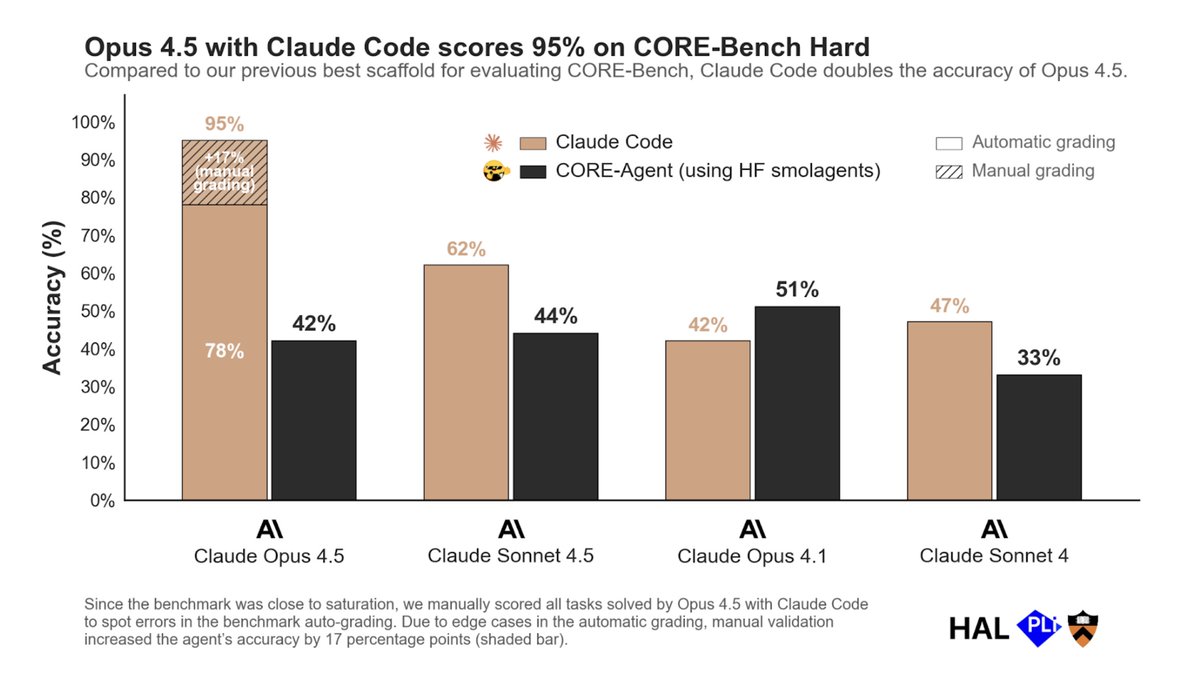 Image from Sayash Kapoor.
The pattern holds across benchmarks. On SWE-Bench Pro, a basic SWE-Agent scaffold achieves 23% with an undisclosed model, while an optimized 250-turn scaffold achieves 45% with the same model. This 22-point swing dwarfs the gap between any two frontier models. On SWE-Bench Verified, simply switching the scaffold produces up to an 11-point difference for GPT-5 and up to a 15-point difference for Kimi K2 Thinking (source).
Even the tiniest detail in a harness can move the needle dramatically. Consider the edit format: how the agent expresses code changes to the file system. Models don't actually express code edits in the same way. In February 2026, an engineer named Can Bölük published an experiment where they changed one thing: the format the agent uses to express code edits. They benchmarked three formats: patch (a diff-style format), str_replace (find the exact original text and swap in new text), and a novel "hashline" format that tags each line with a short content hash so the model edits by referencing hashes rather than reproducing text verbatim. The edit format was the only variable. Across sixteen models, hashline matched or beat the alternatives for most. And one model (Grok Code Fast 1) went from 6.7% with patch to 68.3% with hashline. That is a ten-fold improvement from a formatting choice. If a single design decision in the harness can swing performance by that much, imagine the cumulative gains from a fully optimized scaffold purpose-built for a specific model.
Now look at where the models themselves stand today. The implication is striking, and it can be made in many places. On SWE-Bench Verified, where Epoch AI evaluates every model using the same standardized mini-SWE-agent scaffold, the top six models are separated by barely a percentage point: Claude Opus 4.5 (80.9%), Claude Opus 4.6 (80.8%), Gemini 3.1 Pro (80.6%), MiniMax M2.5 (80.2%), GPT-5.2 (80.0%), and Claude Sonnet 4.6 (79.6%). The entire top twenty spans just 7.1 percentage points. On SWE-Bench Pro, which is harder and less contaminated, Scale AI's SEAL leaderboard runs every model through identical tooling — and the top six are separated by just 4.9 points. On HumanEval, frontier models have converged above 90%. Across the board, when you control for the scaffold, it seems that the models themselves are remarkably close.
Everyone has a good model. Arguably, the harness is the real differentiator. If you're obsessing over which model to use and choosing your coding tool based on the model, you might be optimizing the wrong variable.
The agentic loop
So how does this actually work? What is a harness? A harness has five main components:
- System prompt: this contains instructions, model persona, and constraints that the model should follow. These things shape the distribution of the model for its reasoning and output.
- Tool definitions: what the agent can actually do. These include ability to read files, run bash, search, and edit.
- Context management: this determines what information is available to the model and when. This determines how the model relies on docs and compresses or uses conversation history in responding to the current prompt.
- Execution loop: how the agent plans, acts, observes, and iterates towards a goal.
- Success criteria: how the agent decides it has finished. This is the most critical and most underrated component.
This is the agentic loop. The agent reads files and project structure to build full context. It reasons through the problem. It makes precise, surgical edits, typically using diffs, not regenerating entire files. It runs tests and checks output. And if something fails, it goes back and tries again.
 Image from Claude Code documentation.
The ability of the agent to verify its solutions and self-correct is what allows the agent to stay on-task across hours of work. It doesn't just give up after one failure and ask you what to do. The agent decides when it has finished the mission. Until it decides it has finished, the agent iterates in a simple while loop: observe, think, act, verify.
Principles for agentic coding
By now, you hopefully understand the architecture. You understand why the harness matters. How do you get the best results from these tools? The harness is half the equation; the other half is how you use it.
I've distilled this into a select list of principles which should apply to any AI coding agent.
1) Define success specifically
Given that the agent must decide when it has finished, it is crucial to clearly define what "finished" means. It should be unambiguous. Vague goals lead to vague results, and the agent cannot read your mind or think for you. If you can't define and verify success, the agent probably can't either.
There are a few things I would suggest.
- Plan. Have the agent plan with you before you let it write a single line of code. Ask the agent to outline the approach first. Review the plan. Catch mistakes, push back on things you disagree with, and iteratively refine the plan. Then, when you finally say to implement the plan, the agent is working from a plan you've both agreed on. A good plan will save you so much time in practice because the agent will have to iterate less. This is where I spend most of my time in the loop.
- Use tests. Test-driven development is extremely good practice. Before writing code, write tests first, and then write code to pass the tests. When you give the agent well-designed tests, you're giving it the ability to check its own work and stay in the loop. "Make this work" is subjective, whereas "Make this pass the tests" is unambiguous.
- Prompt specifically: say what you mean. When prompting, you need to say what you want. Specific prompts give the agent exactly what it needs to succeed. Every unclear detail will compound. Invest a minute or two in a good prompt and save many more minutes of back-and-forth.
- Get the agent to ask you questions. When you have an open-ended goal and you're not sure what you want, it helps to get the agent to ask you clarifying questions before it starts work. And agents are good at this. They ask about edge cases you hadn't considered. They flag ambiguities in your request. They review your request and narrow things down for you, greatly increasing the chance that you will like the result.
2) Manage your context
The context window is the agent's working memory, and it fills up quickly.
Long conversations accumulate noise, errors, and outdated assumptions. The agent starts losing track. It forgets what it did earlier. It contradicts itself.
Training with longer sequences has massively increased models' context windows over the last half-decade, which is a fantastic and very useful thing. But it is not a perfect solution at this time to just put everything in-context; past a certain point, performance on longer context starts to degrade, even if the information does fit within the context window. Even Anthropic's own benchmarks for their 1 million token context window show this: Opus 4.6 scores 78.3% on MRCR v2 (notably the highest among frontier models at that scale) but still drops nearly 14 percentage points over a 750K token span. That is a gentler decline than prior model generations, where performance didn't drift downward so much as it fell off a cliff. But the degradation is very noticeable, and gives me pause. Just because you can use 1 million tokens of context doesn't mean you should.
.png) Image from Anthropic's 1M context GA announcement.
Image from Anthropic's 1M context GA announcement.
Some general things I use or do habitually:
- AGENTS.md or CLAUDE.md for persistent memory loaded into every session. These are markdown files at your project root that are loaded into every agent session as system context. Since this is loaded into every session, this is deliberately concise, with the minimum context that the agent needs-to-know every single session. Agents can write to it, so when key conventions are established or there are recurring habits or mistakes we want to enforce, these things can be added to this particular markdown file.
- Skills for reusable prompts that are useful within specific workflows, but do not need to apply to every session. For instance, I might have a particular skill for SLURM workflows for my specific HPC setup, saving me plenty of time when I need to queue experiments, and another skill for logging experiments with specific details and in a specific parsable format. This isn't something that the model needs to know every time, but is useful when I do need it. If there is a task you do habitually and you spend more than a minute writing the perfect prompt for it, skills let you write it once and reuse it forever. Your task-specific best practices are encoded as a command, and the cool thing is that you don't even need to activate it everytime because platforms like Claude Code/Codex automatically do it for you.
- Fresh agents: I start a new session for each feature or when the agent is stuck in a limit cycle and not making progress. LLMs are, at their heart, conditional probability distributions. When their context is polluted with wrong information, they don't necessarily know that or how to treat it. And with current models, performance starts to degrade as the context fills up even if the context window is not completely full. So, when stuck, or when reviewing or debugging code, start with a clean slate.
- Keep your repo lean: As good general practice, you shouldn't have more files or code than needed. If your repo is bloated, with dead or smelly code, duplicate logic, and old experiment notes everywhere, an agent searching your codebase is more likely to have these things pollute the context window, leaving it less room to think about your actual problem.
3) Write things down
Tabula rasa — the smoothed or erased tablet.
Agents lose context between sessions. If you made a lot of progress in one session and the agent was able to learn or find something useful in-context, don't throw all that hard work away! Persist what matters. Distill the important artefacts at each turn of the conversation. Ask the agent to write structured summaries of what it did and why. These could be experiment logs, or recording the logic of important development decisions made in a repo, or some kind of status documents. Whatever you did, if you don't write it down in a file, the next session starts from zero. Tabula rasa. If you do, it starts from where you left off. The compound effect of this over weeks or months of research is enormous. In my repo which is a bit more mature, I have a main EXPERIMENTS.md file, a PAPER_STATUS.md file, and auxiliary markdown files linked from the mains files for archived old experiments and more detailed analysis of other features or experiments. This helps me maintain institutional knowledge of my research project.
4) Force the agent to use tools instead of guesses
What exactly is a tool? My layman definition of a tool is a piece of software that acts as a deterministic function that an non-deterministic agent knows how to use as an abstraction to get a desired result. For example, if an agent wants to know the current time, it could use a tool that checks the current time in the exact same way all the time. Codex and Claude Code know how to use various primitives by default (e.g. glob, grep, bash, web search, web fetch), and they are extremely good at composing these primitives to get desired results in the terminal. Beyond that, the agents are also good at using your own tools: things like pytest, wandb, and others. There is a world of Model Context Protocol (MCP) integrations out there.
If a tool can check it, search it, compile it, test it, or validate it, the agent should use it. Don't let the agent hallucinate file contents; make it read the file and show you the exact lines results are coming from. Don't let the agent write code and just guess that it works; make it run your test suite. By explicitly prompting the model to use tools to verify its work, you force the model to ground its responses in reality. This significantly reduces hallucination rates. Of course, no agent is completely flawless, but this will absolutely minimize your risk.
The agent inherits the full power of your terminal. Anything you can do from the command line, the agent can do too.
5) Iterate, iterate, iterate
The agentic loop is your friend and you should not be afraid to use it.
Don't expect perfection on the first pass. You will be disappointed more often than not. But through iteration, you will converge to a stable solution. Push back when the agent gets something wrong, and it will reconsider and improve. Each iteration narrows the gap between what you asked and what you got.1
Two use-cases in a research workflow
All these principles are good-to-know, but you might ask: how can agents be useful for research? I use Codex and Claude Code on an almost daily basis, and have two use-cases I would like to highlight.
Subagents and agent teams
A simpler one is just the parallelization of work. Sub-agents and agent teams are relatively new features that enable the division of labour. A main agent is responsible for the overarching goal/high-level task, and if the main task is able to be decomposed into a list of smaller tasks, then we can divide and conquer these smaller tasks with subagents or teams. This allows you to make faster progress on a high-level task and keep your main agent's context clean. The main drawbacks in my opinion are that they rapidly consume tokens, and make the black box even more black-boxy in that you don't always pay attention to what the subagents are actually doing. So, proceed at your own risk.
The main difference between sub-agents and agent teams is that a subagent setup decomposes a high-level task into disjoint subtasks, and assigns each subagent some portion of the pie. Subagents do not communicate with each other, and therefore subagents are the way to go if the subtasks are strictly independent of each other. One example is in doing several different branches of experiments that are all independent. In that case, we can assign one subagent to each experiment branch and let them run and monitor their own experiments.
On the other hand, agent teams creates a shared task list, and agents in the team are able to communicate with each other on task progress. The ability to communicate and share task progress is the main distinction for whether agent teams or subagents is the right tool for your goal. I haven't used this feature too much, but I had some mild success using it to redesign my website where I had some agents write code, some agents focus on design and visual quality, and some agents focus on catching bugs and code review.
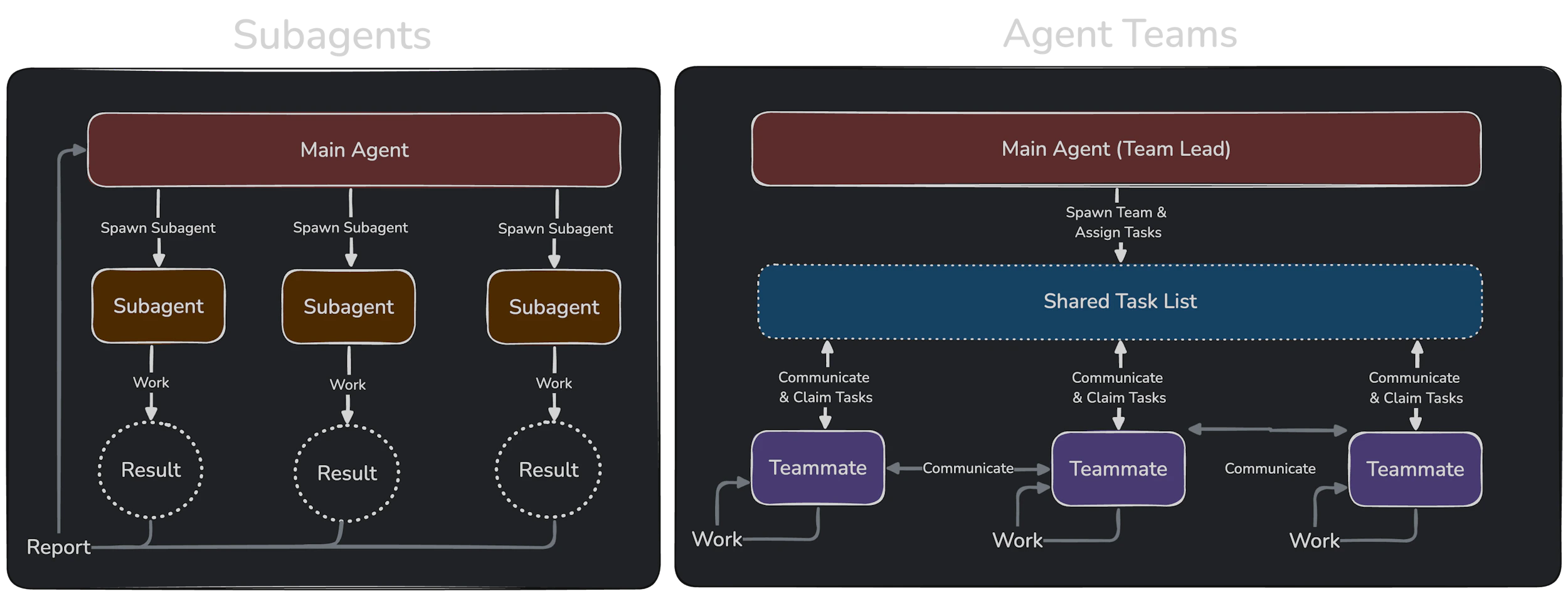 Image from Anthropic's docs on Agent Teams.
Research project management
This particular use-case is probably controversial, but please hear me out. I am not suggesting that the agent take over a whole research project. In my opinion, they just aren't good enough yet (fortunately) to do everything without a human-in-the-loop, and have occasional yet noticeable issues with memory, drawing incorrect inferences, or just making bad suggestions.
However, consider this. Typically, when doing research, you would write down everything about your research. You would write your ideas, your math, your engineering plans, your experiments, your results, your decisions. If you write everything down, the agent can read your entire project state in seconds. Faster than you ever could. Faster than you could even remember where everything is.
So, I maintain structured documentation; living documents that capture the state of my research project. Every time an experiment is run, or a new feature is implemented, or a decision is made, I ensure that the agent has updated the docs, keeping the state fresh. Then, the next session picks up exactly where this one left off. And if I ask an agent: "What experiments have we run? What's left? What do the results say so far?" The agent is able to read all my documents, cross-reference results in structured logs and jsons, and display them in compact structured summaries. They even identify gaps in my methodology and experimentation that are sometimes useful. This work might take me thirty minutes carefully re-reading my notes and finding all the files or scrolling through endless wandb logs, but Claude or Codex can do it in seconds. It can tell me what's been run versus what's missing. This is project management, done by an agent, grounded in real file system state.
This requires much more careful curation of documentation, and careful management of agent context. When my documents or code were bloated, the agent would forget things sometimes, and I would have to point them out. But if managed well, you always have a much faster hint to where you are, and you can always ground the agent in the truth since everything is written down.
Conclusion
Let's summarize. In just about 5000 words, we have covered a history of AI coding tools spanning three eras, explained what an agent and what a harness is, covered five general principles for agentic coding, and two use-cases in my own research workflow. That's a lot of words!
If you take one thing from this essay, let it be this: the gap between models is small, but the gap between how people use them is not. The differentiator is no longer a model, but is everything around it — the model harness, the context engineering, the curated documentation, the clarity of thought in a prompt. Many of these things are still within our control.
For a long, long time, a huge bottleneck to progress was knowledge and technical skill. Right now, in my opinion, the bottleneck is moving toward taste, specification, and judgment. This shift may be uncomfortable, and I have no idea what the major bottleneck of progress will be a year from now. Agentic coding may be completely different. But at least in the near term, I'm quietly confident that investing in learning how to steer these agents will have positive compound effects. You are welcome to disagree, and I would likely agree with many of your points against these tools. The most important thing is that you think about these tools, are aware of what they do, and understand why you are or are not using them.
I can only thank you if you read this until the end, and I hope that this was helpful to you.
Footnotes
-
I will admit I was inspired somewhat by Banach's fixed point theorem. ↩